
I used to think printer size was easy to judge until I had to figure out whether one would actually fit into a particular storage area. A printer can look compact from the front but take up much more room once you account for its depth, height, paper trays, and other parts. That made me realize that width alone tells you very little about how much physical space a printer occupies.
I also found that cubic feet makes more sense when comparing equipment for storage, moving, or workspace planning. Instead of guessing from a product photo, you can use three simple measurements and get a much clearer number. The result will not tell you everything about the space you need, but it gives you a useful starting point.
How Many Cubic Feet Is a Printer?
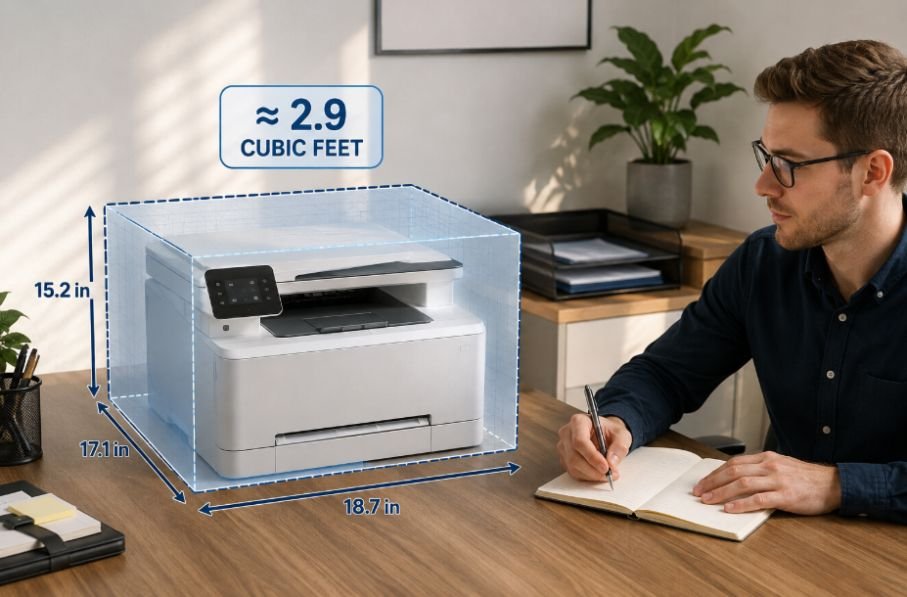
A typical printer can occupy roughly 0.7 to 3.7 cubic feet, although the actual volume depends heavily on the type and model. Compact home inkjet printers can stay around 1 cubic foot or less, while larger all-in-one and office laser printers can reach 3 cubic feet or more.
For a quick reference, a printer measuring 17 × 14 × 7 inches has a volume of about 0.96 cubic feet. A larger 18 × 16 × 10-inch home-office model comes to about 1.67 cubic feet. A 20 × 20 × 16-inch office machine reaches about 3.70 cubic feet.
These figures describe the printer as a rectangular block. They do not mean the machine literally fills every part of that imaginary box.
Actual printer dimensions vary considerably. For example, current manufacturer specifications show compact inkjet all-in-one models around 425 × 304 × 154 mm, while larger laser multifunction machines can be close to 500 × 400 × 470 mm.
How to Calculate a Printer’s Cubic Feet
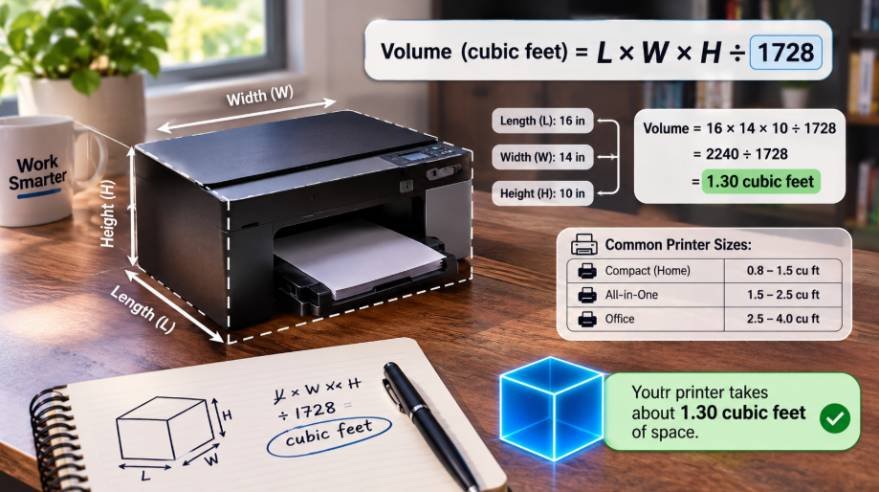
Calculating printer volume is straightforward when you have the dimensions in inches.
Use this formula:
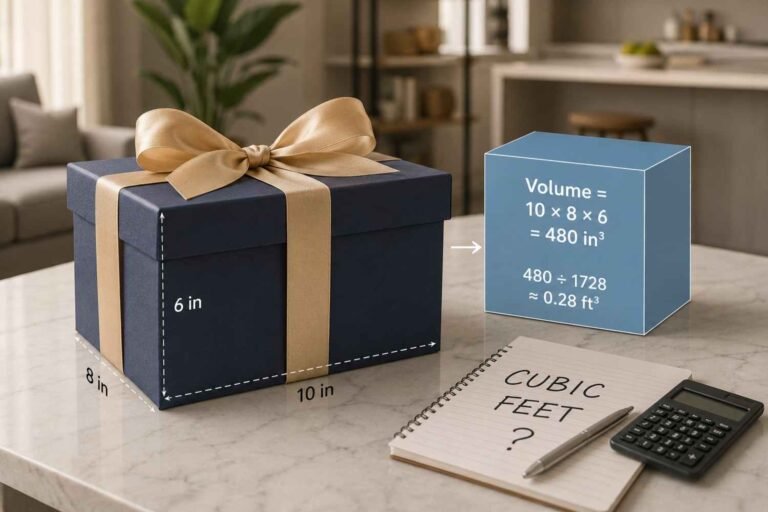
Length × Width × Height ÷ 1,728 = cubic feet
There are 1,728 cubic inches in one cubic foot, so the final division converts your measurement into the unit you need.
For example, suppose your printer measures:
- Length: 18 inches
- Width: 16 inches
- Height: 10 inches
First, multiply the dimensions:
18 × 16 × 10 = 2,880 cubic inches
Then divide by 1,728:
2,880 ÷ 1,728 = 1.67 cubic feet
So the printer’s approximate physical volume is 1.67 cubic feet.
If your manufacturer lists measurements in millimeters or centimeters, convert them to inches first if you want to use this formula.
Printer Size Breakdown by Type
Different printer categories can occupy very different amounts of space. The following ranges are useful estimates rather than fixed industry standards.
Compact inkjet printers
Small home inkjet printers generally have the smallest footprint. A rough example is 17 × 14 × 7 inches, which works out to about 0.96 cubic feet.
These models are designed for occasional home printing and can usually sit comfortably on a modest desk. Some are even smaller, although the available space can increase when input or output trays are extended.
For comparison, one current compact all-in-one model has closed dimensions of about 425 × 304 × 154 mm, but its maximum dimensions increase to 425 × 546 × 250 mm with the output extension fully open.
All-in-one home office printers
Printers that combine printing, scanning, and copying usually need more room because of the scanner assembly and additional paper handling.
An example measuring 18 × 16 × 10 inches would occupy about 1.67 cubic feet. That is still manageable for most home offices, but it is noticeably larger than a basic compact printer.
If you are comparing this space with something like a laptop box, remember that the box dimensions and the printer’s operating dimensions are two different measurements. A boxed item can have a larger volume even when the device itself is relatively compact.
Office laser and multifunction printers
Office-oriented laser printers can become much larger. A 20 × 20 × 16-inch machine would occupy about 3.70 cubic feet.
Some commercial models go beyond that, particularly when they include additional paper trays, stands, or finishing equipment. One manufacturer lists a laser printer at roughly 482 × 510 × 458 mm before optional equipment is added.
That is why larger office printers often need their own stand or cabinet instead of sharing a small desk.
Why the Printer’s Listed Volume Is Not the Whole Story
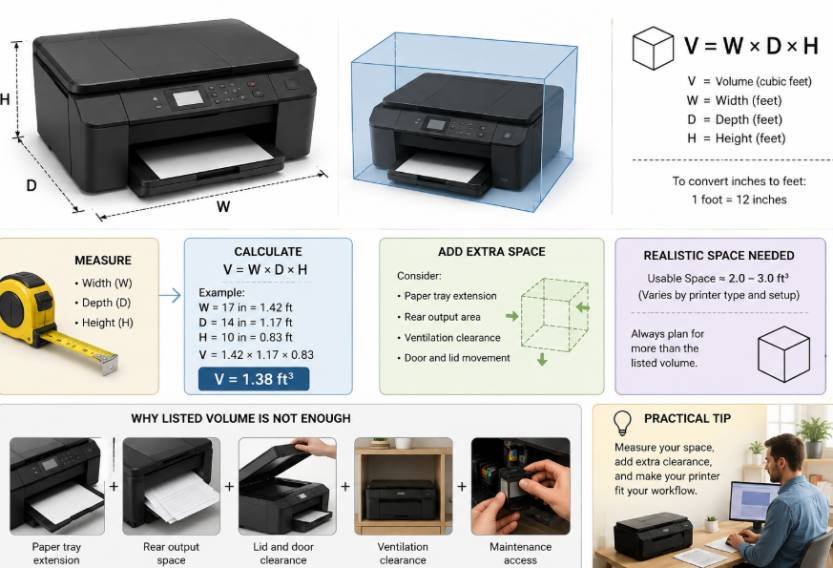
Cubic volume is useful, but it should not be confused with the amount of space you actually need.
This becomes particularly important when placing a printer inside a cabinet. A cabinet that technically has enough cubic feet may still be unsuitable if you cannot open the scanner, load paper, remove a cartridge, or reach the controls.
The same issue applies when planning a moving truck or storage area. The printer’s closed dimensions are useful for estimating packed volume, but you should also consider its box, protective material, cables, and accessories.
Printer Footprint vs. Cubic Volume
There is another measurement that may matter more than cubic feet depending on what you are trying to do.
If you are placing a printer on a desk, the footprint is usually more important. Multiply the printer’s length by its width, and you know approximately how much desk surface it occupies.
Cubic feet adds height to the equation, making it more useful when comparing storage capacity. A tall printer and a low printer could have similar footprints but very different volumes.
The distinction becomes especially useful when comparing a printer with a desktop computer. A desktop may occupy more floor or desk space while having a different overall cubic volume, so comparing only one dimension can give you a misleading picture.
Check the Maximum Dimensions Before Buying
Manufacturers commonly provide closed dimensions, but some also list maximum dimensions with trays and extensions opened.
That difference can be substantial. One compact model, for example, increases from about 425 × 304 × 154 mm when closed to roughly 425 × 546 × 250 mm with its output extension fully open.
This matters if your printer sits underneath a shelf or inside a tight workstation. A machine might fit when closed but become difficult to operate once you extend the tray.
Before measuring your space, check the product’s full dimensions rather than relying only on the main body measurements.
How Much Space Should You Leave Around a Printer?
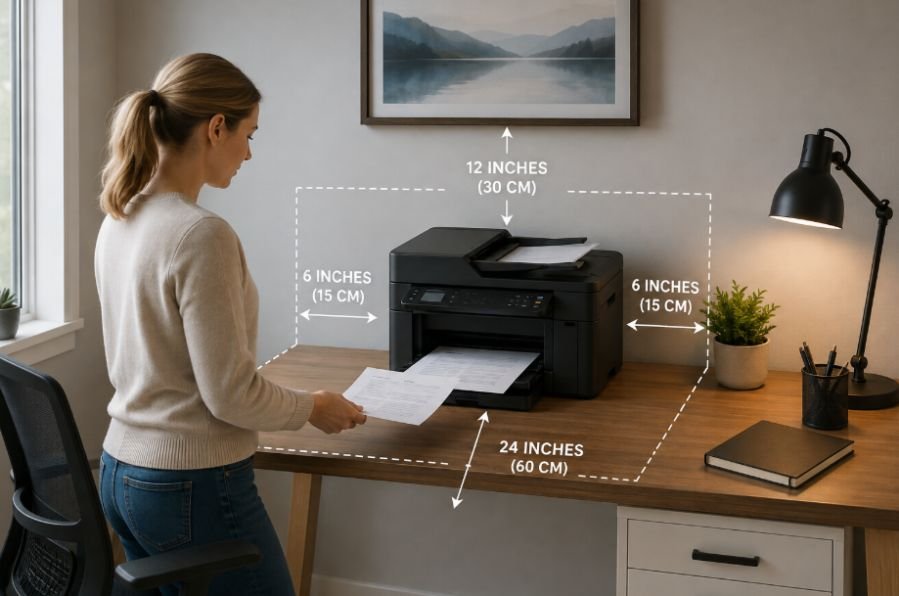
There is no universal clearance number for every printer because the required space depends on the model and how it handles paper.
Still, avoid treating the calculated cubic volume as the exact size of the storage compartment you need. Leave room for:
- Paper loading and removal
- Output trays
- Power and USB or network cables
- Scanner-lid movement
- Ventilation where required
- Cartridge or toner replacement
- Access to buttons and controls
For everyday use, accessibility matters just as much as raw volume. A printer squeezed into a space with no room to open or service it can become frustrating very quickly.
A Simple Way to Estimate Your Printer’s Space
If you only need a quick estimate, start with the manufacturer’s width, depth, and height.
A compact printer may fall close to 1 cubic foot. A typical home-office all-in-one can land around 1.2 to 2 cubic feet. Larger office machines may reach 2.5 to 4 cubic feet or more.
Then look at the maximum open dimensions. This second check tells you whether the printer will actually work in the location you have chosen.
If you are planning storage or transportation, measure the packaged printer instead of the bare machine. Packaging can add several inches to each dimension and therefore increase the cubic volume considerably.
Frequently Asked Questions
1. What is the average cubic feet of a printer?
A typical printer can range from about 0.7 to 3.7 cubic feet. Compact home models are often below 1 cubic foot, while larger office machines can exceed 3 cubic feet.
2. How do I calculate a printer’s cubic feet?
Multiply the printer’s length, width, and height in inches. Then divide the result by 1,728. The answer is the approximate cubic-foot volume.
3. Does printer size include open trays?
Usually, the listed product dimensions describe the printer in a closed or standard position. Check the manufacturer’s maximum dimensions if trays, extensions, or scanner components need additional clearance.
4. Is printer volume the same as the space it needs?
No. Cubic volume measures the printer’s approximate physical size. The usable space must also allow for paper handling, cables, ventilation, maintenance, and opening moving parts.
Why Measuring the Space Can Save You a Headache
Printer volume is simple to calculate, but the useful answer goes beyond one number. A compact inkjet around 1 cubic foot can behave very differently in a workspace from a 3.5-cubic-foot office multifunction printer. The physical volume gives you a baseline, while the footprint and maximum operating dimensions tell you whether the printer will actually work where you plan to put it.
A few minutes with a tape measure can prevent a surprisingly annoying problem later. Measure the printer, check its open dimensions, and give yourself enough room to use it comfortably.

Ryan Mitchell
Ryan Mitchell holds a degree in Civil Engineering and spent over a decade working in construction project estimation, where accurate volume and material calculations were part of his daily work — from concrete pours to landscaping material orders. He founded this site to bring that same precision to everyday calculations, helping DIYers, contractors, and students get fast, accurate cubic footage results without the guesswork. Ryan reviews every calculator and formula on this site for accuracy and writes guides based on real-world measurement scenarios he's encountered on job sites.